
Esdra: everything new from 4 to 17 October 2026
From catalogue and POS to warehouse work and conversations: a complete product roundup with examples and screenshots, opening with Huberway Academy’s adoption journey.
First: Huberway Academy
New features matter when they become part of everyday work. Huberway Academy supports businesses in adopting tools such as Esdra and building practical team skills.
- Start with processes and progress to practical software use.
- 18 learning areas, with study, exercises and coaching according to the assigned learning path.
- Use Learn for instructions and Academy to build a shared working method.
Catalogue: more useful search and filters
Improvements focus on large catalogues and consistency between catalogue and POS searches.
- Combine product fields, categories, brands, attributes, prices, dates, images and warehouse conditions where enabled.
- Guided fields, conditions and values, saved filters and more readable controls on small screens.
- Shared POS search keeps attribute conditions on the same product or variant while reducing metadata work.
- Quick stock and image filters and continuity when opening and closing a product.
Sheet view: see remaining sizes without horizontal scrolling
The sheet keeps the item in context across many size columns. The 17 October update adds a direct preview of sizes with positive stock.
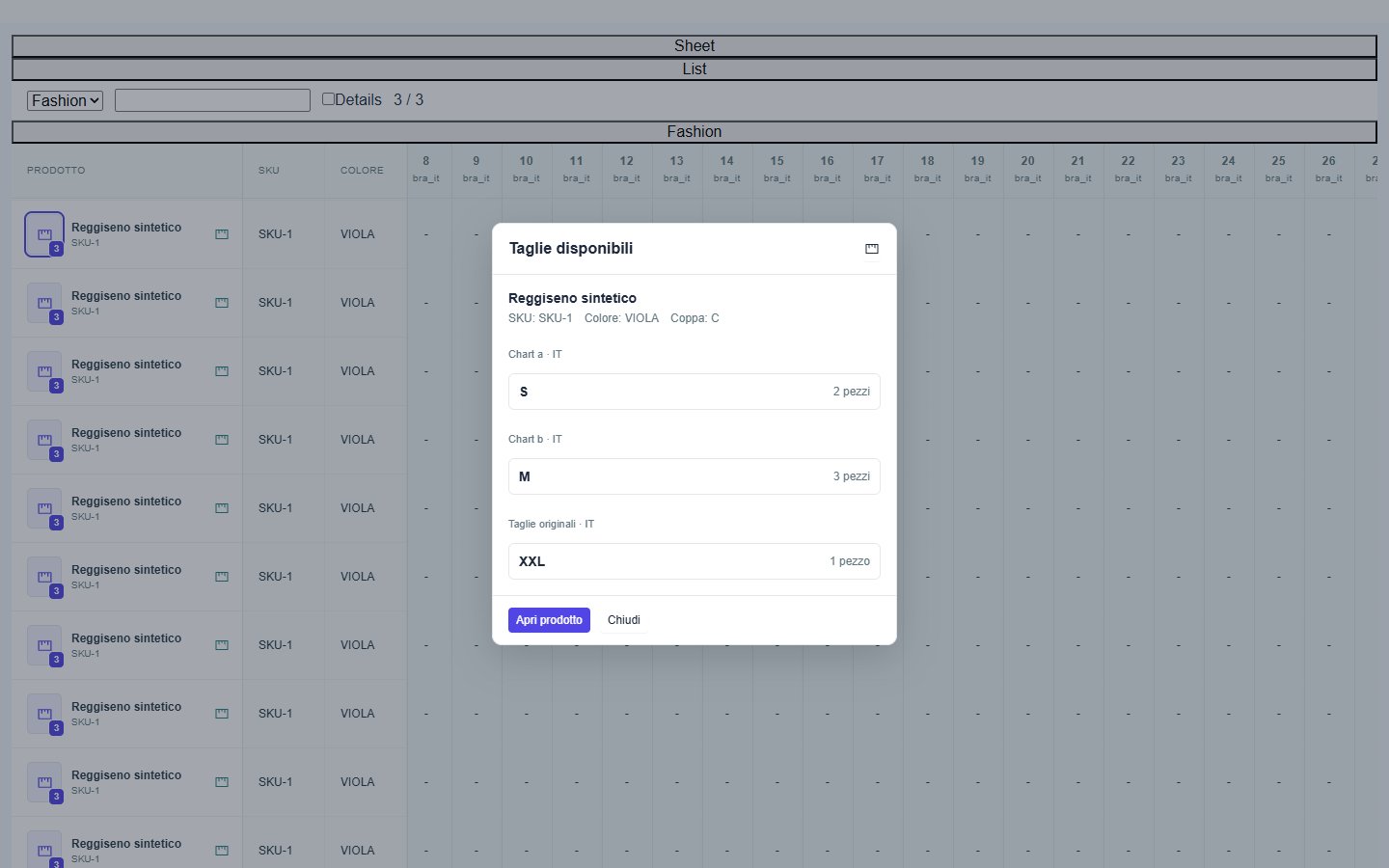
- Product, SKU and colour stay readable while scrolling; overlapping headers and rows have been corrected.
- Click the photo or counter at the start of a row to see available sizes, quantities, colour and cup.
- Zero and negative quantities are excluded, and distinct size charts stay separate. Open product takes you to full details.
- Closing the preview preserves the sheet position. The trigger remains available when photos or size columns are hidden.
- Column widths, order, colours and visibility remain customisable, with progressive row loading.
Categories: prepare a season without rebuilding the tree
Reuse a season’s structure and keep the category you are working on in view.
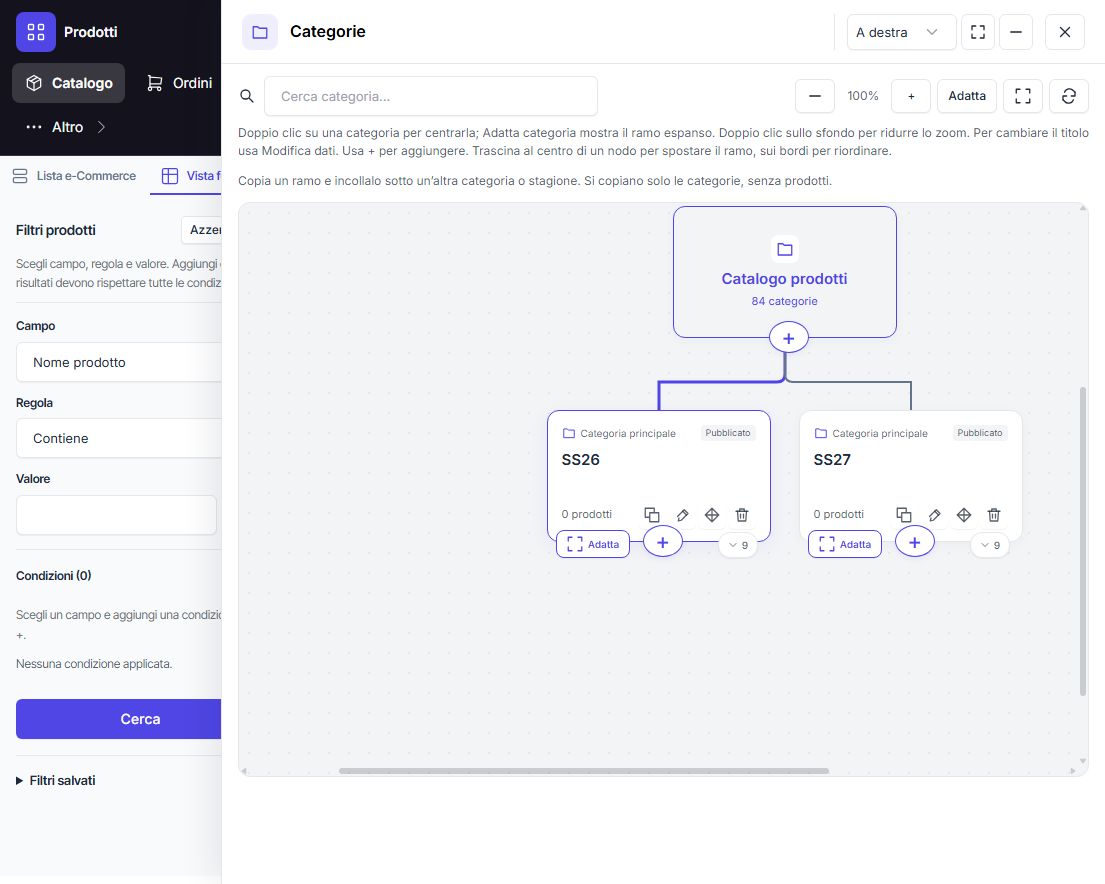
- Copy a category and all descendants under another season, such as SS26 to SS27.
- Only categories are copied. Products remain assigned to the originals; new deliveries can use the new categories.
- Expand and Collapse centre the selected card at the current zoom; double-click the card to centre it.
- Fit on a card frames its currently expanded branch. Double-click the background to zoom out.
- Darker connectors highlight with the card border. Change titles only through Edit details and Save changes.
- Branch moving, ordering and association-aware deletion confirmations remain available.
Product details: main image, gallery and 3D media
The Media section separates the main photo from the gallery and prepares presentation settings for compatible channels.
- Multiple-image upload, ordering, alternative text and product, detail or lifestyle roles.
- Main-image selection, visibility, framing and focal points, with thumbnail, grid or slider settings.
- GLB model, poster and rotation/camera options. Website display depends on the connected frontend.
- Custom product field and block layout, with dragging and keyboard controls.
Sizes: company standards and consistent charts
Further work improves size-chart and measurement-system handling for fashion and underwear.
- Company display standard and charts associated with products.
- Separate size and cup, preserve source labels and show known equivalents.
- Identical labels from different charts stay distinct; missing mappings are never guessed.
- Displaying equivalents does not automatically rewrite historic products.
POS: one product view before adding to a sale
Product photos and cards open item details, bringing variants, availability and locations into the same context.
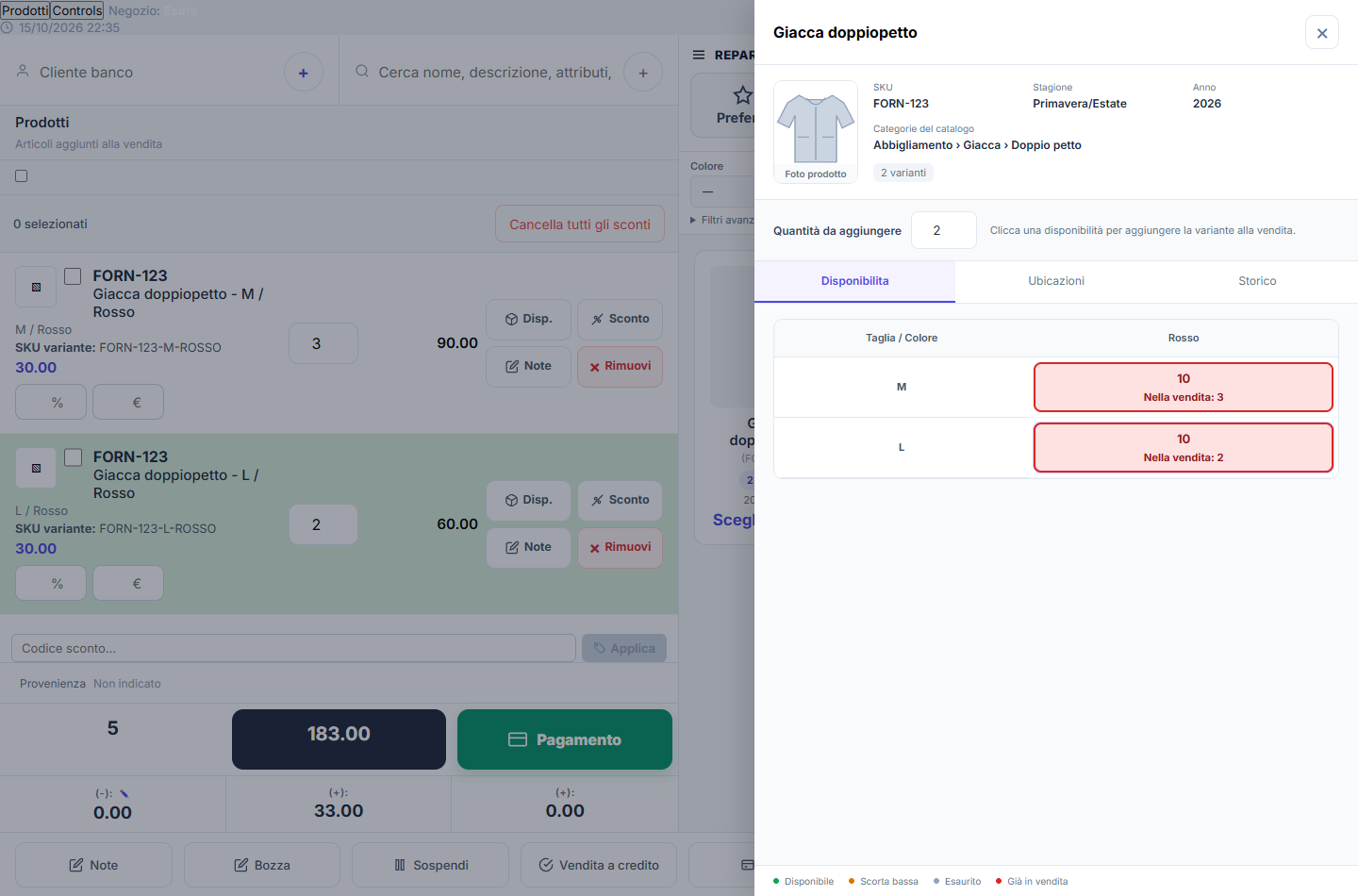
- Availability shows sibling variants with attributes, prices and quantities.
- Photo gallery, physical locations and item/variant history. Photos in the current sale remain viewable.
- Main article code before the name, with a smaller variant SKU.
- Quick colour, size and cup filters plus guided advanced catalogue filters.
- Progressive POS catalogue scrolling and improved menus on small screens.
Vouchers and checkout: clearer steps
Voucher creation and management now make the people and checkout context easier to distinguish.
- Improved voucher builder controls and document preparation.
- Customer search or creation, separate recipient and attributed operator.
- Voucher management inside the POS, with code search, balance and movements.
- Checkout context is preserved; uncertain outcomes retain drafts for verification.
- Existing controls over voucher movements and checkout operations remain in place.
Orders, purchases, CRM and PLM: work through stages
Compact columns and cards connect the overview to the record details.
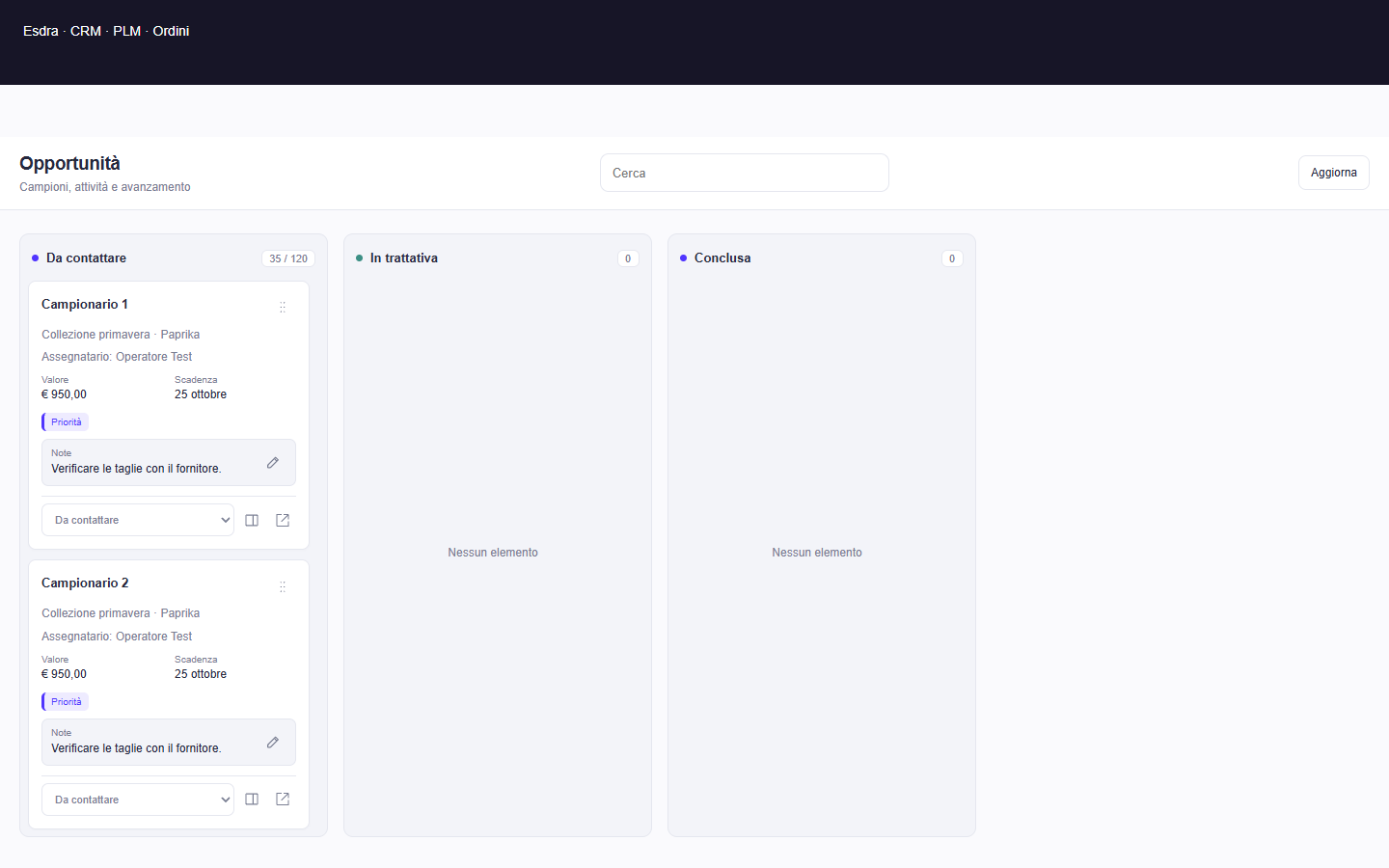
- Kanban views across CRM, PLM, orders and purchases, with independent column scrolling, dragging and detail panels.
- Notes and quick editing where available, retaining application controls.
- Create CRM records in side panels while keeping list context.
- Cancel a new order draft back to the list, with confirmation when changed.
Warehouse: find locations and work from a device
Warehouse screens now better connect mobile operations to physical locations.
- Corrected 2D/3D loading and selection of the shared 3D entrance.
- QR labels for warehouses, entrances, areas, shelves, levels and containers prepare a destination to check.
- Simplified mobile/PWA interface with guided search, operational controls and clear success/error feedback.
- Personal operator QR badges created and managed by an authorised supervisor.
- Operations require connectivity, permissions and confirmation. Scanning alone does not move stock or create an offline movement queue.
Reports: from template to results
The reporting area now connects lists, templates, editing and dashboards in a consistent workflow.
- Filterable templates and previews.
- Charts, filters, date ranges and comparisons, plus save and copy.
- Folder organisation and corrected counts after moving reports.
- Dashboards, reading view, authenticated sharing and permission-based CSV export.
Customers: acquisition sources and private feedback
Record how a customer found the shop and collect feedback in a dedicated space.
- Optional sources and details in customer records, POS and quick order creation.
- Shop-specific sources and filters, plus optional advertising attribution on an individual sale.
- A shareable shop link, with email verification before accessing a customer record or submitting feedback.
- Registration, record recovery and later feedback; opinions remain private to the customer and authorised staff.
- Source attribution or feedback does not automatically subscribe a customer to marketing.
Inbox and Community: more continuous conversations
The period’s work aligns conversations across ERP, POS, Marketing and Learn while preserving access controls.
- Shared Inbox rendering for messages, groups and Community, with a collapsible dock and retained drafts.
- Emoji, files and voice notes where supported; drag-and-drop attachment previews.
- Linked replies, updates after sending and bottom opening without moving someone reading earlier messages.
- Sent, Delivered and Read receipts when confirmed, plus authorised online/offline presence.
- Author photos, message menus, long press and five business reactions.
- Clickable links with a destination preview. External-channel capabilities depend on the channel and configuration.
Marketing: clearer lists and delivery setup
The setup journey better separates contact lists from sending.
- Clearer list and sending-parameter configuration.
- The released workflow includes the verified CRM source connection.
- Sending still requires valid transport configuration and recipient checks.
- A contact’s presence in the ERP does not start a subscription or campaign.
Learn: more help for everyday operations
21 practical guides connect catalogue setup, warehouse work and POS sales, alongside content and collaboration improvements.
- A learning route connecting products, stock and sales.
- Illustrated guides, improved editing, attachments and content management.
- Shared Community Inbox and continuity across desktop and mobile.
- A new Academy banner, an Academy special and this 4–17 October product roundup.
Website, support and everyday details
The points where people meet the product also received updates.
- EVA’s site presentation and voice, and a short mascot animation on the 404 page.
- Fashion ERP page with 3D visuals, consistent link arrows and navigation.
- Unread-notification previews, new-message alerts and sound controls; a less intrusive sign-in badge.
- More readable sign-in-code emails and service-status links.
- Demo environment and operational fixes, with demonstration data kept separate from real work.
Accounts and BID: recognisable sign-in
Access improvements connect Esdra to the BID brand while keeping identity separate from operational data.
- Sign in with BID and the existing-account linking journey retain the required verification steps.
- Companies, roles and history stay in the product. A shared identity does not automatically merge profiles or data.
- Updated sign-in emails make the code easier to read and copy.
In preparation: supporting migration from previous systems
Migration assistance is being developed alongside the available releases. It is not presented as a universally active historical importer.
- A five-step guide and CSV-analysis/mapping tools have been prepared.
- Historical-data coverage, import execution and portal availability require specific checks and activation.
- The released features described above follow account permissions, enabled modules and configuration.